One-Stop Diagnostic Design Tool VisualODX V5: Supports Multiple Data Formats, Solves Industry Data Unification Problems
Background and Challenges
Background
In the field of automotive diagnostics, with the continuous development and technological progress of the industry, data exchange and standardization have become core issues. The cooperation between OEMs and component suppliers is becoming increasingly close, but the lack of unified data formats, development standards, and diverse needs have brought many challenges to the good collaboration in the industry.
Challenges
1) Inconsistency of Data
There may be differences in the data formats used by OEMs and component manufacturers, with OEMs using ODX and component manufacturers favoring CDD. This inconsistency not only increases development costs, but also prolongs the project cycle and affects overall efficiency.
2) Reverse Development Issues
Some OEMs rely on data provided by component factories for reverse development due to a lack of their own diagnostic standards. Although this approach can meet demand in the short term, in the long run, it is not conducive to technological innovation and the accumulation of independent intellectual property rights, and is not in line with the direction of industry development.
3) Challenges of Data Diversification
Different customers and projects may use different data formats, which means that engineers often have to switch corresponding tools frequently. Therefore, it is necessary to realize the unified processing of data formats by tools to reduce the complexity of data format conversion and improve development flexibility.
Introduction of Diagnostic Data
CDD, ODX, and ARXML are three common diagnostic database formats that all describe diagnostic database information. However, in practice, it is not usual to rely on only one of these formats. In order to meet the needs of different functions and scenarios, data conversion may be required between the three of them, thus enabling data flow and interaction between different stages and tools. In addition, there are often core differences between the three formats in terms of standardization organization, application scenarios, data structure and toolchain support.
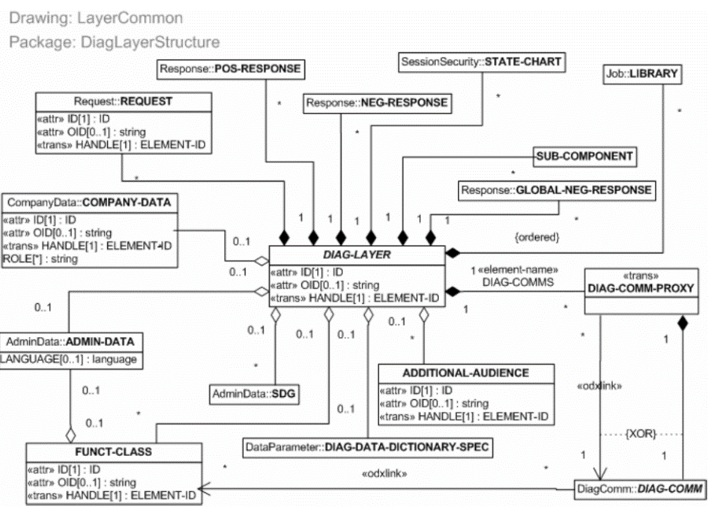
(Fig. 1 Diagnostic Hierarchy Elements UML Structure, Source: ISO 22901-1)
Definition Description
1) ODX(Open Diagnostic data eXchange)
•ISO standard (ISO 22901-1), XML-based format for open diagnostic data exchange;
•Used to describe diagnostic parameters, communication protocols, fault codes (DTCs), DIDs, and other information;
•Supports cross-vendor and cross-toolchain compatibility, widely used in diagnostic tool-ECU interaction.
2) CDD(CANdela Diagnostic Description)
•Proprietary data format of the German company Vector, not an open standard, mainly used in its tool chain (CANoe, CANdela Studio, etc.);
•Describes diagnostic services, signal mapping, communication parameters, etc., and supports diagnostic requirement definition, test case generation, and automated testing;
•Data completeness is more centralized, focusing on single ECU diagnostics.
3) ARXML(AUTOSAR XML)
•AUTOSAR standardized core data format for describing the vehicle software architecture, ECU configuration, communication matrix and some diagnostic modules;
•Supports system-level design, covering software component integration, hardware resource allocation and diagnostic configuration;
•Expandable, modular design to support multi-domain expansion.
Data Structure Differences
1) CDD and ODX Are Both Used to Describe Diagnostic Data, but They Have Different Emphases
ODX is a diagnostic data format for the whole vehicle system, which needs to integrate the information of multiple parts and contains more complex logical relationships, and is more generalized; while CDD focuses more on the diagnostic needs of single parts, contains local information, and is adapted to specific tools.
2) Semantic Mapping Problem
Due to differences in naming conventions, unit definitions, and data organization methods, semantic mapping issues may arise when converting data from one format to another. These issues typically require manual intervention or complex automated rules to solve.
3) Data Consistency and Integrity
In ODX, it is necessary to describe the constraints between a single ECU and the vehicle level, but these relationships are not reflected in CDD, which may lead to consistency and integrity issues in the data conversion process.
4) Version Compatibility
Both CDD and ODX have their own version specifications, for example, some features required by the new version of ODX may not be supported in the old version of CDD files, which requires adaptation and upgrade processing during data conversion.
5) ARXML
ARXML is the "global description format" for automotive systems, often used for system design, software architecture integration, etc. Diagnostic information is only a part of its overall data model. Therefore, in practical use, ARXML often needs to be combined with other modules to fully play its role.
Solutions Introduction
Overview
The VisualODX diagnostic design tool independently developed by WINDHILL is an effective solution tailored for the automotive industry.It supports the combination of diagnostic database editing and Excel table conversion, and can generate a variety of industry-standard file formats with one click, including ODX/PDX/CDD/DEXT/ARXML files, etc., eliminating the need for tedious manual steps to build a database, thus effectively solving the problem of data inconsistency between parts factories and OEMs.
Program Introduction
Core functions of VisualODX V5:
1) Complete Data Editing Function
Not only does it support data import, but it also provides a complete editor.
2) Data Format Compatibility
Compatible with multiple industry diagnostic file formats (ODX/CDD/DEXT/ARXML) and OEM proprietary formats.
3) Support ODX/CDD Interconversion
The generation of ODX and CDD files can be achieved through a single table without the need to switch tools; Support importing CDD and supplementing missing parameters to generate complete ODX/PDX files.
Advantages
1) Industry Standard Support
VisualODX diagnostic design tool can generate multiple industry standard file formats (such as ODX/PDX/CDD/DEXT/ARXML, etc.) with one click, compatible with mainstream production, testing, after-sales and other toolchain software on the market, ensuring data compatibility between different enterprises and systems, effectively solving the problem of data inconsistency between component factories and OEMs.
2) Intelligent Automation
The tool combines diagnostic database editing and Excel table conversion functions to support the entire process of data creation, editing and exporting, significantly reducing manual workload. Through automated processing, it greatly improves the efficiency and accuracy of data processing, while reducing the risk of human error.
3) Inspection Mechanism
The software comes with a consistency check function that combines ODX syntax specification and ASAM standards for double checking, effectively avoiding manual errors and ensuring data accuracy.
4) Platform Based Support
The software supports platformization and enables collaboration among multiple departments to achieve cost reduction and efficiency improvement.
5) Massive Data Processing
Supports import and export of diagnostic data for individual and complete vehicle controllers, with unlimited number of Excel tables.
Software Functions
At present, WINDHILL has officially released VisualODX version 5. This version contains Expert Mode and Quick Mode, and users can adapt to different operating habits through one-key switching function, so as to meet diversified needs.
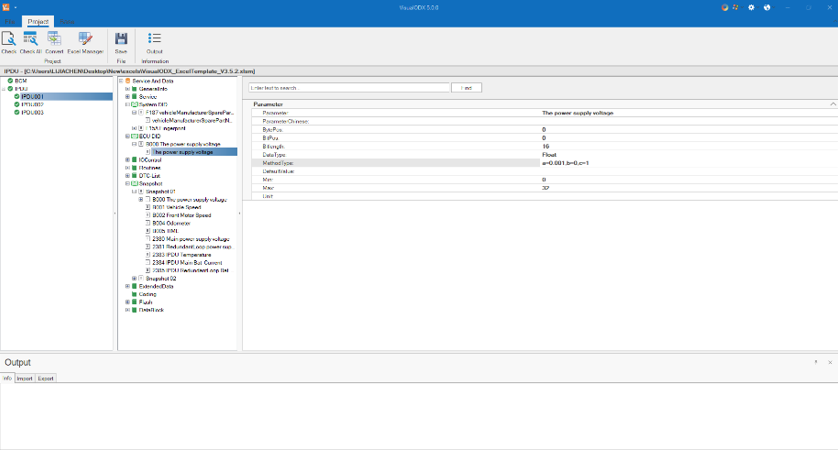
(Fig. 2 VisualODX Software Interface - Expert Mode)
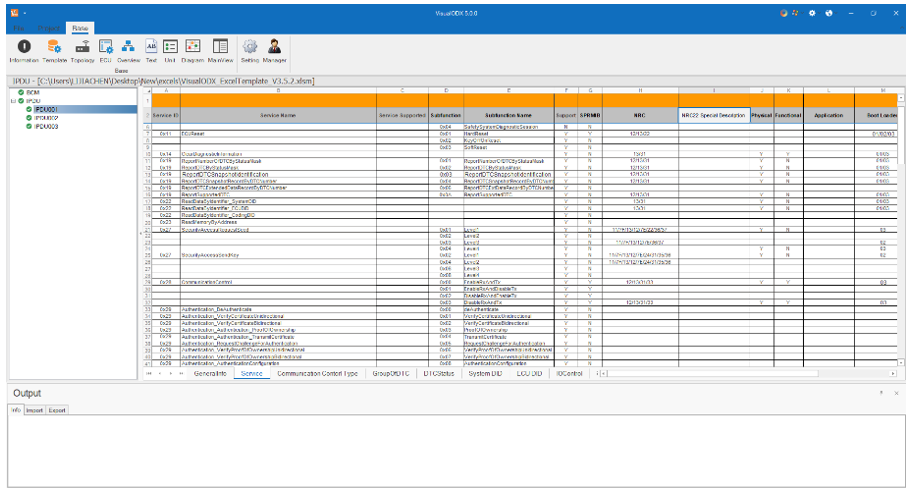
(Fig. 3 VisualODX Software Interface - Quick Mode)
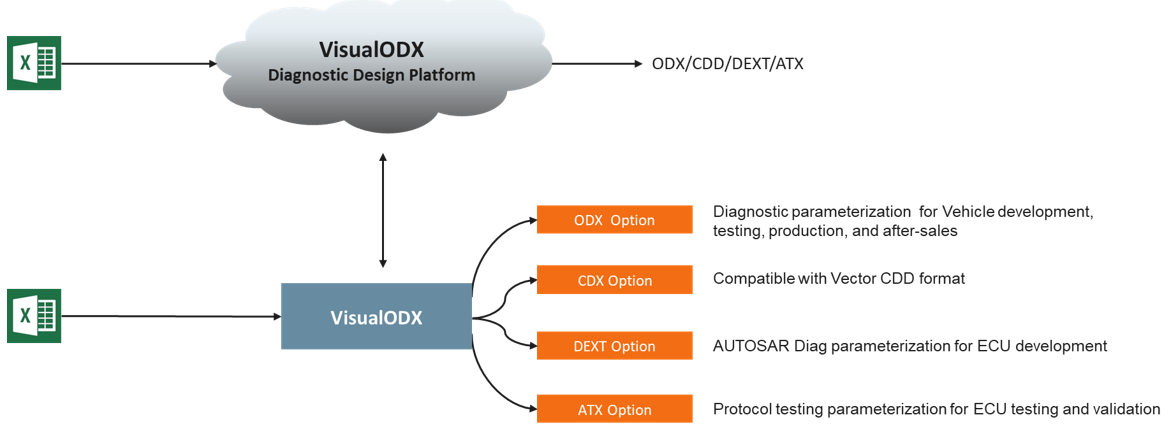
(Fig. 4 VisualODX Product Family)
Functions
1) Link File
•Supports importing diagnostic questionnaires (Excel), generating *.odx-d, *.odx-e, *.odx-f files, and constructing a complete diagnostic database;
•Multiple EVs can be added to the controller with an unlimited number.

(Fig. 5 Project-Link File Import Form)
2) Check
•Provide integrity checking and data validation of configuration files, able to locate errors with one click.
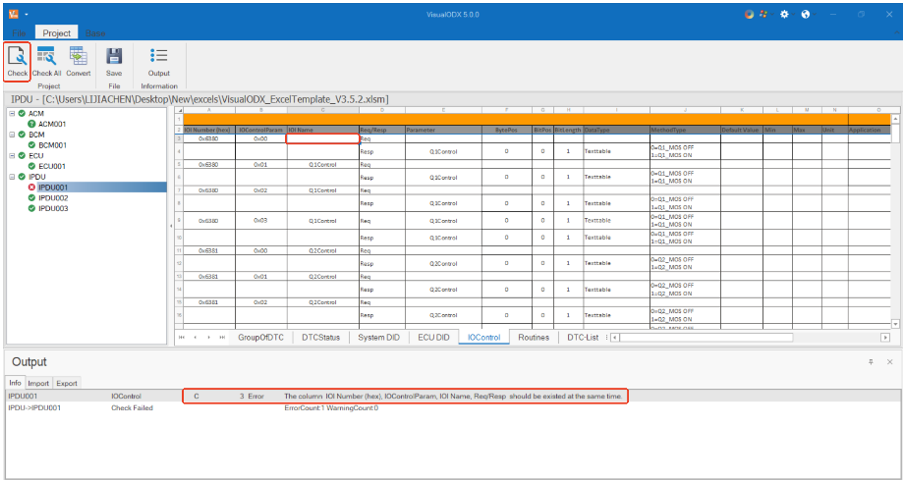
(Fig. 6 Project-Check checking function)
3) Convert
•Supports exporting ODX/PDX/CDD/DEXT/ARXML files.
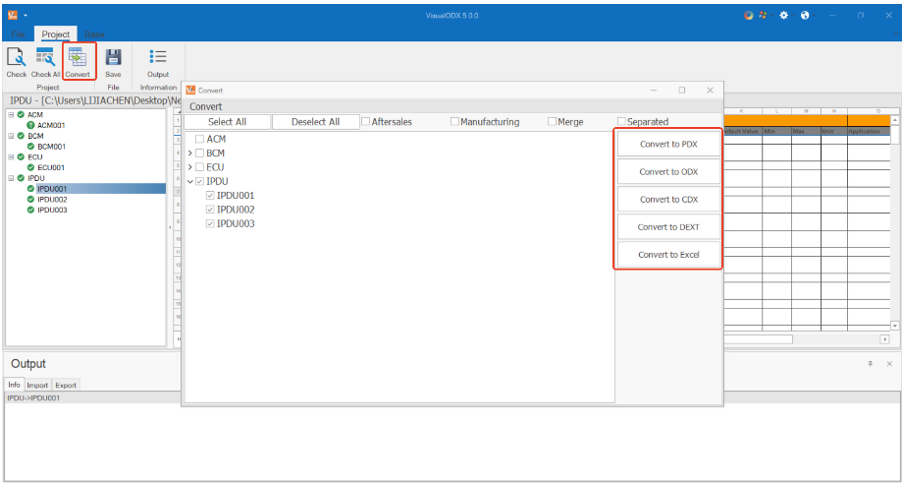
(Fig. 7 Project-Convert Export)
Summary
VisualODX, with its multi format compatibility, intelligent editing capabilities, and forward-looking support for industry trends, not only simplifies the process of creating diagnostic data, but also becomes a "Data Translator" and "Technology Accelerator" that connects the entire lifecycle of vehicles. It makes complex diagnostic logic transparent, makes scattered data islands interoperable, and ultimately helps the industry move from "functional implementation" to a new level of "system collaboration".
In the future, with the continuous deepening of in vehicle networking and diagnostic technology, VisualODX's standardized bridging role will become increasingly prominent, becoming an indispensable core tool in the intelligent automotive diagnostic ecosystem.
Previous Updates
▶ In-Depth Analysis: ODX Diagnostic Database as ISO22901-1 Standard