CAN Communication Silent Mode: Principle and Applications

Background:
With the advancement of intelligent connectivity, electrification, and autonomous driving technologies, vehicle electronic systems have become increasingly complex. A modern passenger car typically integrates dozens to hundreds of ECUs, which must achieve efficient and stable communication within milliseconds. The CAN (Controller Area Network) bus known for its high reliability and real-time performance, serves as the communication backbone for critical systems such as body control, powertrain, chassis, and battery management.
To meet the requirements of functional integration and modularity, in-vehicle networks are evolving toward multi-bus and multi-node parallel architectures. During development, testing, and redundancy control design, engineers often require "non-intrusive" bus monitoring—where nodes can receive data without transmitting or participating in arbitration to avoid disrupting the main system. To address this, the CAN protocol introduced Silent Mode, a low-risk, highly reliable monitoring mechanism widely applied in debugging, redundancy backup, and communication security scenarios.
Challenges:
1. Risk of Accidental Message Transmission: Test or debug nodes typically have transmission capability by default. If a message is sent erroneously, it may interfere with the main system, posing safety hazards.
2. Arbitration-Level Interference: Even if no actual transmission occurs, physical signals during arbitration may disrupt communication from higher-priority nodes.
3. Redundant System Conflicts: If backup controllers share the bus without silent mode, they may collide with messages from the primary controller, compromising fault tolerance.
4. Unreliable Software-Based Blocking: Simply disabling transmission via software lacks hardware isolation. Messages may still be sent during software exceptions, failing to meet functional safety requirements.
The Importance and Significance of Silent Mode:
CAN Silent Mode is a communication state that only receives data without transmitting, enabling non-intrusive bus monitoring by nodes and preventing system interference caused by accidental message transmission. It is widely used in scenarios such as debugging, diagnostics, and redundant control.
During development and testing, Silent Mode prevents test equipment from erroneously sending messages, enhancing debugging safety. In functional safety systems like autonomous driving, backup controllers use Silent Mode to monitor the primary controller's status, ensuring secure and reliable failover. For applications such as OTA updates and remote monitoring, Silent Mode allows external tools to safely access the bus without disrupting normal communication.
Compared to software-based transmission blocking strategies, Silent Mode achieves isolation of transmission functionality at the hardware level, significantly enhancing safety protection and facilitating compliance with standards like ISO26262. As a universal and secure communication mechanism, Silent Mode plays a critical role in modern automotive CAN systems.
Definition of Silent Mode:
CAN Silent Mode refers to a node operating state where the CAN node only receives bus data without performing any transmission operations, while also not participating in bus arbitration or physical level driving. Nodes enabled with Silent Mode do not generate any interference to the bus and remain transparent to other nodes at the physical layer. This mode is commonly used in debugging, monitoring, or backup control systems to ensure the safety and non-intrusiveness of data monitoring.
Working principle of Silent Mode:
The implementation of Silent Mode relies on configuration registers within the CAN controller. By setting the Silent bit in the control register, the controller disables its CAN bus driving capability while retaining only the receiving function.
In this mode, even if the application layer attempts to call transmission functions, the controller will neither output electrical signals nor occupy the bus, and will not participate in the arbitration process. This mechanism ensures that the node can execute normal code at the logical layer while causing no interference to other communication nodes at the physical layer. Silent Mode can be enabled through software configuration in most mainstream CAN controllers and is commonly used in typical application scenarios such as debug module access, redundant node monitoring, and bus data collection.
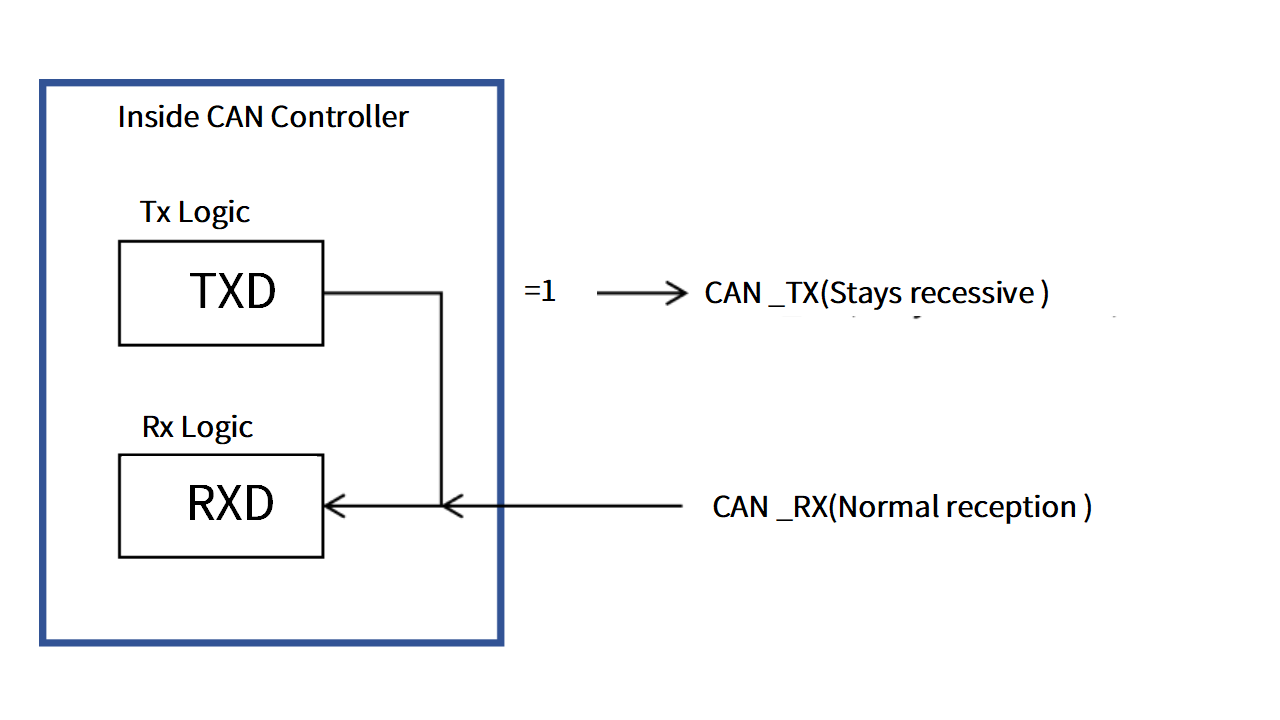
( Fig.1 CAN Bus Silent Mode)
Comparison with Standard Mode:
Comparison | Standard Mode | Silent Mode |
Transmission capabilit | Support sending CAN messages | Prohibit sending any messages |
Reception capability | Support receiving message | Support receiving messages |
| Arbitration participation | Participate in CAN bus arbitration, may affect bus occupancy | Does not participate in arbitration, completely passive monitoring |
Physical layer driving | Enabled, may output level signals affecting the bus | Disabled, does not drive the bus, physically transparent |
| Impact on other nodes | May cause conflicts or interference | Does not generate any interference |
Bus safet | Risk of message transmission; configuration or program errors may interfere with the main system | High security, hardware-level transmission blocking to avoid system interference |
Participation in error management mechanism | Participates in error frame transmission and active error correction | Does not transmit error frames, only receives error information |
In modern vehicle electronic systems, CAN Silent Mode is widely applied in multiple critical scenarios due to its "receive-only, non-transmitting" non-intrusive characteristic. Here are its typical applications in vehicle engineering:
1. Safe Monitoring During Debugging and Testing
During early vehicle development, engineers often need to connect to the bus for message monitoring, protocol validation, and functional debugging. By setting debugging tools to Silent Mode, accidental message transmission that could disrupt the system is prevented. This is especially crucial for safety-critical buses (e.g., powertrain, braking) to ensure testing does not interfere with operational logic, making it a standard configuration for debugging tools.
2. Primary/Backup Monitoring of Redundant Control System
In systems with high functional safety requirements (e.g., autonomous driving, electric drive control), primary and backup controllers often share a CAN bus. The backup controller must remain completely silent while monitoring the primary controller's status and only activate if the primary fails. Silent Mode enables this "always-listening, standby-ready" hot-swap capability, forming the basis for safe redundancy architecture transitions.
3. Remote Diagnostics and OTA Updates
During remote diagnostics (e.g., UDS services) or OTA updates, external diagnostic tools or updaters must avoid disrupting existing bus communication. Silent Mode allows these devices to receive real-time system status and capture message traffic without actively participating, ensuring system integrity during operation and upgrade safety.
4. Passive Gateway Monitoring in Multi-Channel Communication
In some vehicle architectures, multiple CAN buses operate simultaneously (e.g., powertrain, body, diagnostic buses). Certain communication gateways or bridging modules require read-only monitoring of other buses for forwarding, synchronization, or logging. Silent Mode ensures these modules never transmit to non-target networks, preventing bus resource conflicts and enhancing system isolation.
5. Fault Reproduction and Black Box Data Collection
After vehicle anomalies or accidents, engineers must replay and analyze on-site CAN data. Data loggers in Silent Mode enable non-intrusive data capture without altering the original communication state, providing reliable evidence for fault diagnosis and liability analysis.
IPEmotion is a professional-grade data acquisition and vehicle testing software widely used in automotive electronics, powertrain systems, thermal management, and NVH (Noise, Vibration, and Harshness) engineering. It supports multiple hardware platforms and communication protocols, including CAN, LIN, Ethernet, and FlexRay etc., offering robust bus data acquisition, message parsing, signal monitoring, and logging capabilities. It is particularly suited for data management and test automation in vehicle development and debugging processes.
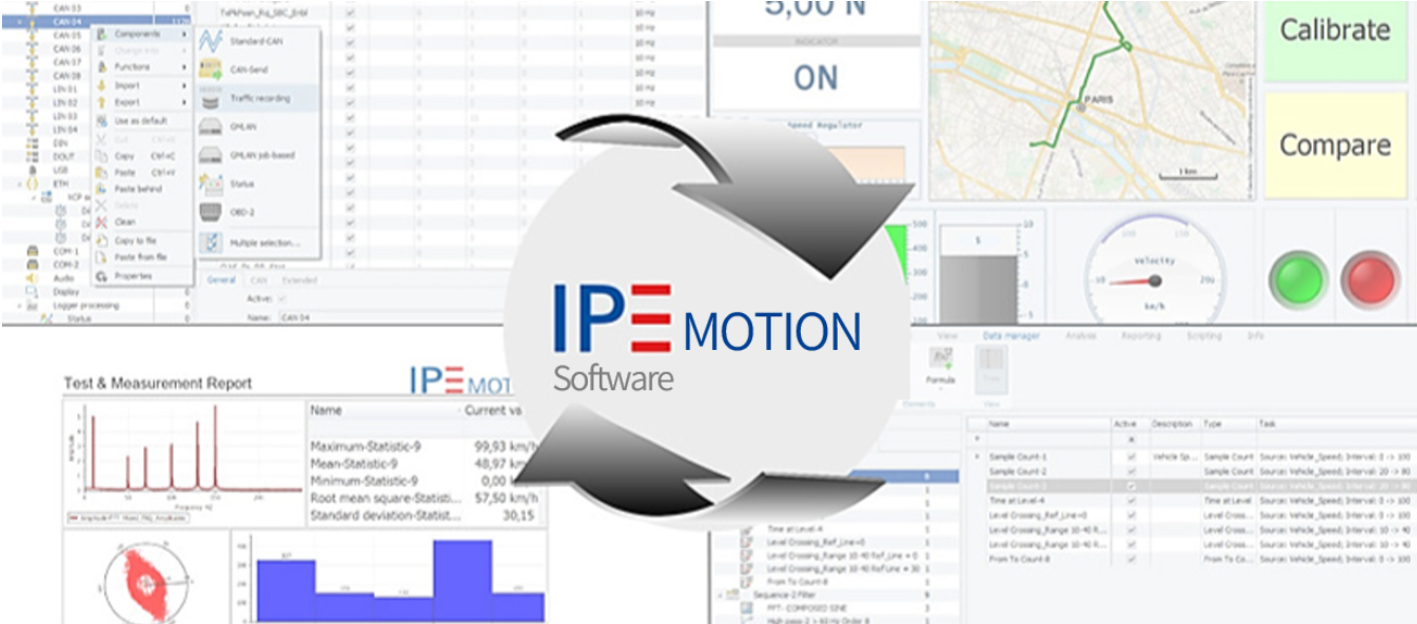
(Fig.2 IPEmotion)
In CAN network debugging, IPEmotion provides flexible CAN channel configuration capabilities, allowing users to set parameters such as baud rate, protocol databases (e.g., *.dbc files), and signal definitions based on testing requirements. The software supports configuring single or multiple CAN channels in Silent Mode, ensuring connected devices function solely as monitoring nodes without actively transmitting any data.
Key applications of this feature include:
Real-time CAN bus message capture without disrupting original vehicle communications;
Preventing accidental frame transmission during debugging that could interfere with the system;
Enabling physical-layer isolated monitoring for external data loggers and testing tools connected to vehicle buses;
Meeting "non-intrusive testing" requirements for functional safety standards like ISO 26262.
The procedure for configuring CAN Silent Mode in IPEmotion is as follows:
1. Open IPEmotion, select "Hardware" > "Protocol," and click "Detect."
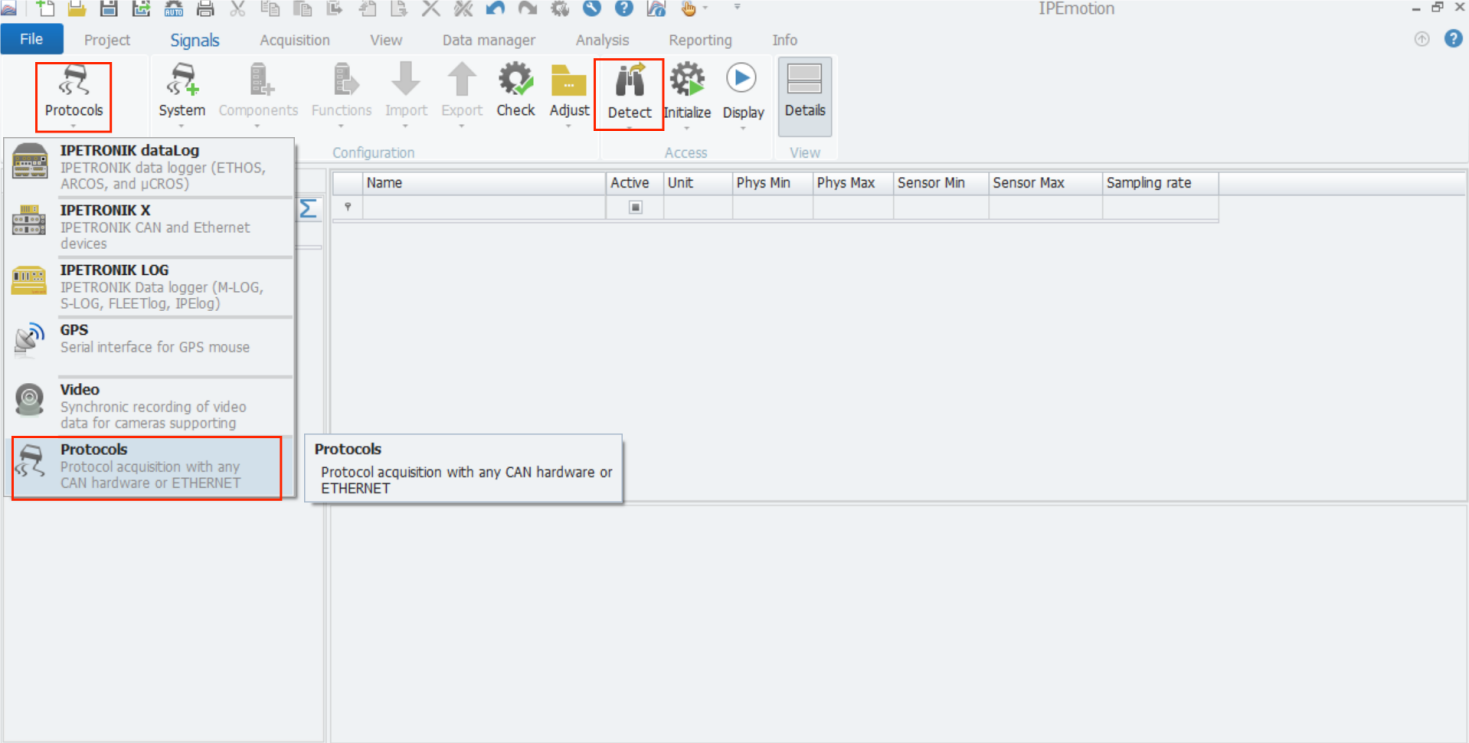
(Fig.3 IPEmotion Set CAN Silent Mode Process 1)
2. After detecting the CAN bus, select the target CAN port. navigate to the "CAN" tab and deselect "Send/ACK Mode." in the configuration interface.
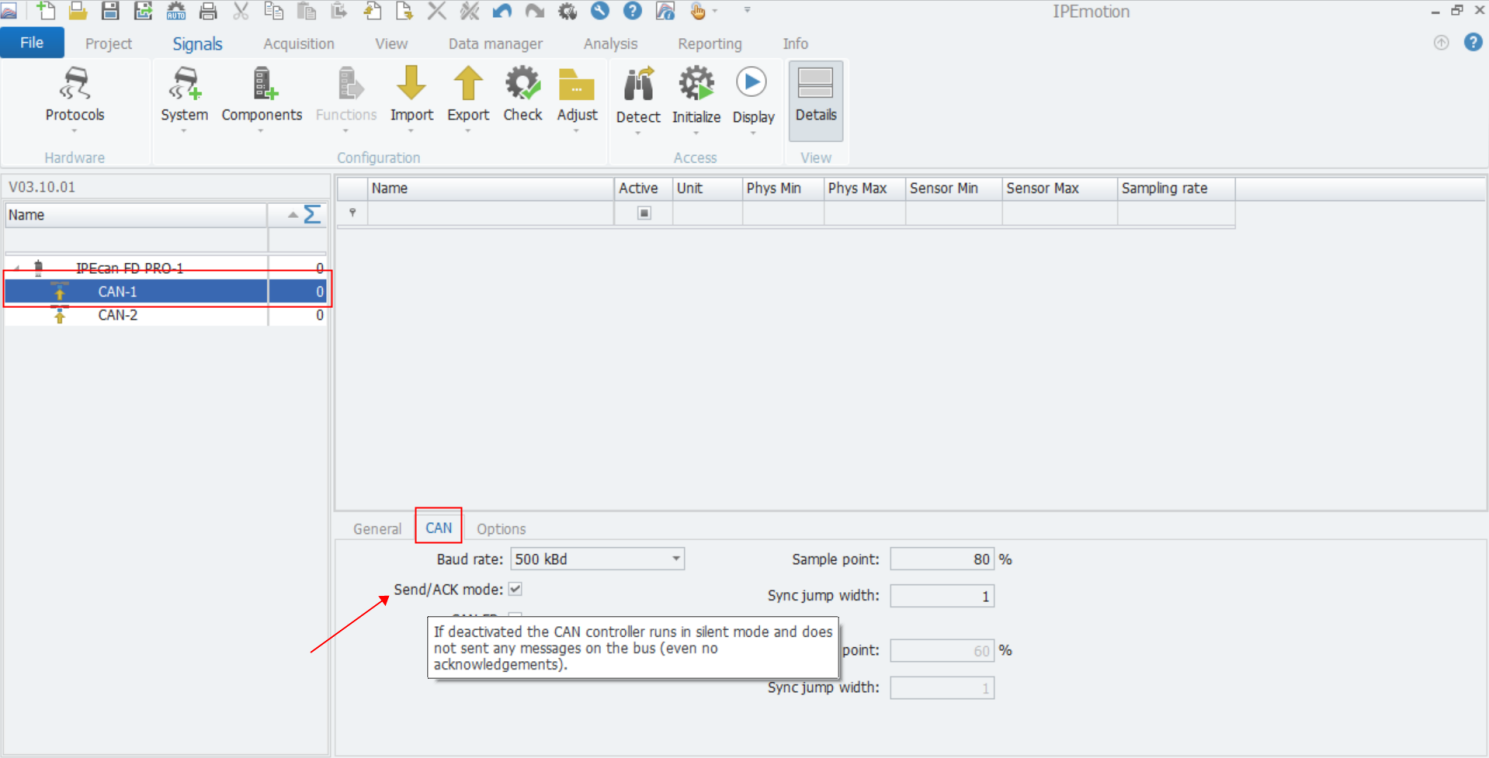
(Fig.4 IPEmotion Set CAN Silent Mode Process 2)
3. Click "Initialize" to save the settings. Once in Silent Mode, the selected CAN port will not transmit any messages to the bus, ensuring no interference with the bus network.
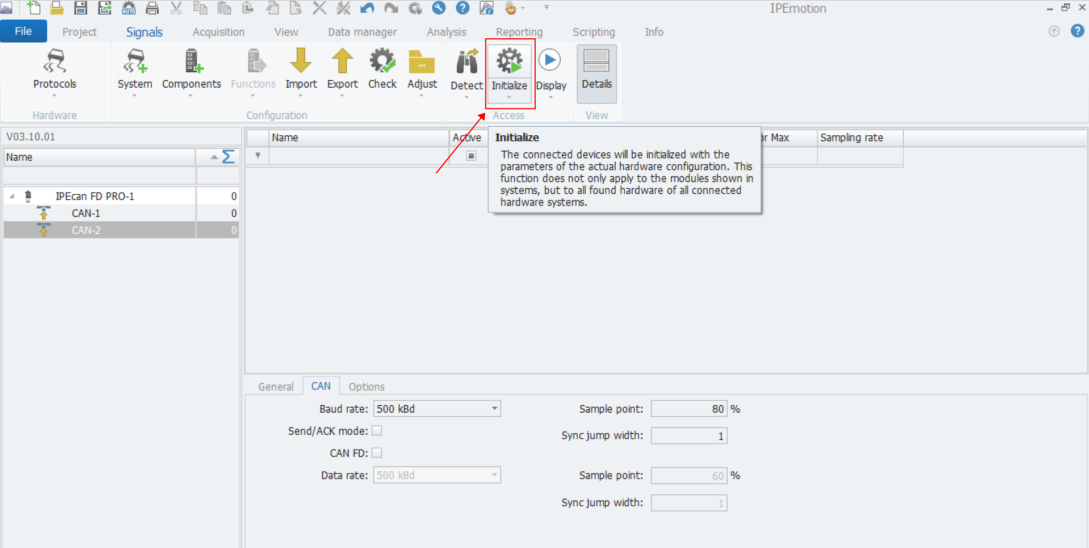
(Fig.5 IPEmotion Set CAN Silent Mode Process 3)
Previous Updates
▶ IPEmotion Easily Solves Emergency Stop Device Control and Data Storage Problems
▶ Using Hotkeys to Quickly Adjust Multiple Channels | IPEmotion